 December 22nd, 2025
If it feels like AI image and video tools have exploded over the last couple of weeks… you’re not imagining it.
There have been more meaningful updates in image and video generation in the past 14 days than we used to see in six months — so this first issue of the weekly AI Tools Newsletter is a catch-up edition. Going forward, we’ll narrow this down to 1-3 standout tools per week so you can actually keep up.
Let’s dive in - it's long! But the weekly ones will just be 1-3 new tools, so they'll be a lot easier read. At the end are links to my webinars on key AI tools.
 IMAGE GENERATION — REAL DIFFERENCES
 ChatGPT – GPT Image 1.5
What’s new:
GPT Image 1.5 introduces a deeper understanding of instruction hierarchy, vastly improving the way edits and creative direction are interpreted — instead of random variations, it produces meaningful responses to layered prompts. It's also four times faster than the previous version. It's also very good at handling text.
Why this matters:
This feels less like trying again and more like directing an assistant — closer to a creative workflow than a random generator.
Try it: in your ChatGPT Images tab

ByteDance – Seedream 4.5
https://seed.bytedance.com/en/seedream4_5
What’s new:
Cinematic visuals with refined lighting, textures, and detail
Stronger spatial logic and prompt interpretation for complex layouts
Much better multi-reference consistency (characters, lighting, structure stay coherent) - multi-reference is where you blend multiple images together
Sharper typography and layout control, ideal for marketing & posters
High-resolution output (up to ~4K) with stable outputs
It's a strong competitor to Google's Nano Banana Pro.
Why it matters:
Seedream 4.5 solves some of the most persistent AI image problems — inconsistent subjects, bad text, and sloppy layouts — bringing creative results closer to studio-ready without heavy manual editing.
 VIDEO GENERATION — WHAT’S ACTUALLY NEW
 Kling 01 / Kling 2.6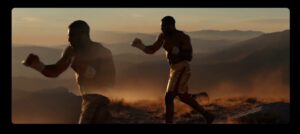
What’s new:
Kling O1 is a major update bringing a unified AI video model that combines generation and editing, allowing complex tasks like changing subjects, backgrounds, or styles in one prompt, plus new control features like Start/End Frame Logic for smooth transitions, Motion Transfer, and improved character/object consistency, moving beyond simple text-to-video to intelligent cinematic tools.
Key Features of Kling O1
Unified Generation & Editing: Breaks down barriers between creating and editing, using text, images, and video inputs in one workflow.
Intelligent Editing: Use natural language to remove objects, change weather, or swap elements without manual masking/rotoscoping.
Multi-Task Prompting: Perform multiple creative ideas (e.g., swap subject and background) in a single prompt, not step-by-step.
Precise Control:
Start & End Frames: Define start and end images for precise transitions (morphing, scene blending).
Motion Transfer: Allows users to extract camera movements or character actions from a reference video and apply that exact motion to an entirely new scene or character. .
Camera Control: Mimic camera pans or generate new angles from existing footage.
Enhanced Consistency: Better character and object identity preservation across shots, even with camera movement.
Flexible Duration: Supports generation lengths from 3 to 10 seconds for more narrative freedom.
Reference Images: Use multiple reference images for consistent characters, outfits, or props.
Why this matters:
You can create a video combining all sorts of different elements, And then edit it by removing parts of the video, changing parts and angles, adding elements, and making the video just exactly as you want. And doing the editing in one step rather than multiple sequential steps.
 Runway – Gen-4.5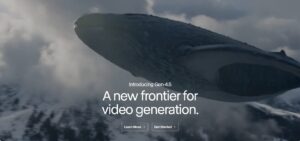
 https://runwayml.com/product (scroll to Gen-4.5)
What’s genuinely new:
Gen-4.5 isn’t just a “better Gen-4”. It introduces:
• Physically plausible motion — objects and people move with believable weight & momentum, reducing the floaty/float-around look that plagues many video generators.
• Cinematic realism by default — more natural camera motion, improved lighting cues, and smoother dynamics.
• Wider stylistic control — supports photoreal, cinematic, and stylized outputs without sacrificing consistency.
Why this matters:
Runway Gen-4.5 feels less like a toy and more like a professional creative engine — especially for creators who care about movement quality, camera dynamics, and storytelling continuity.
Try it here: https://runwayml.com/product
 ByteDance – Seedance 1.5
https://seed.bytedance.com/en/seedance1_5_pro
What’s new:
Native joint audio + video generation — audio comes with the video, not after
Multilingual voice + precise lip syncing
Cinematic camera and motion control
Better semantic understanding of narratives and scenes
Character consistency across shots and multi-scene flows
Why it matters:
Seedance 1.5 pushes AI video generation beyond silent visuals into true audiovisual storytelling (like Google's VEO 3.1), letting creators generate compelling, sound-ready clips with emotional nuance and cinematic behavior — all from smart prompts.
 Adobe Firefly – Video Editor Beta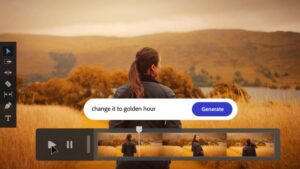
What’s new:
Adobe expands from “prompt → clip” into timeline editing — letting you fix parts of a video without regenerating everything.
Why this matters:
This is real integration of AI into traditional video editing workflows, not just AI generation.
 BIG THEMES IN THIS WAVE
Instead of incremental improvements, the tools in this wave are pushing toward:
Motion intelligence over still-frame aesthetics — tools like Kling and Runway Gen-4.5 are treating movement as meaningful content, not just a sequence of images.
Story structure replace sequence chaining — ByteDance Seedance is built around multi-shot understanding.
Professional workflows merge with AI generation — tools like Adobe Firefly and Runway are bridging gaps between creative tools and AI variants.
 WHAT’S NEXT
Starting next week:
1-3 tools per issue
Clear “What’s New” explanation
Who should care (practical applications)
Quick examples, when useful
No hype. Only what matters for your creative work.
As always — bring tools you want to explore to our bi-weekly live Q&A, and we’ll go through them together.
And get caught up on the ones you miss at the live webinar replays at https://aiconnectionclub.com/ai-101-webinars/